Wednesday, January 11, 2012

TELcp version 3.0 Full version

Final release of TELcp V3.0 full version is now available online at www.telcp.com
It provides full support for IDN.
You can also create folders in any language that support UTF-8.


Available Features for tel Owners

Tel Page Management:
  • Create/edit/delete title
  • Create/edit/delete header
  • Create/edit/delete contact details
  • Create/edit/delete location details
  • Create/edit/delete keyword texts
  • Create/edit/delete text ads
  • Create/edit/delete image ads
  • Create/edit/delete delete records
  • Organize records (desktop only)
  • Upload/edit/delete logo

Tel Domain Management:
  • Grant OAuth authorization
  • Add domains to TELcp
  • Test access token validity
  • Renew access token manually
  • Create/edit/delete Adsense ads
  • Create/edit/delete folders
  • Create/edit/delete folder labels
  • Show/hide folders
  • Edit templates

TELcp site Management:
  • Delete domain from TELcp (without affecting tel domain/folders at CTH)
  • Send mass email to all Users
  • Send email to single User
  • Send email to TELcp Administrator
  • Send Invitation email to tel Users
  • Invite tel Users
  • Assign tel Users to folders
  • Suspend tel Users
  • Delete tel Users
  • Select TELcp page colours
  • Change email address
  • Change password
  • Change local time zones
  • Change calendar style
  • Change language (English by default)
  • Change tel User access levels (page content management by tel Users)
  • Change access tokens if registrar of domain changed
  • Upgrade account to paid plans


Available features for tel Users

Tel Page Management:
  • Create/edit/delete title
  • Create/edit/delete header
  • Create/edit/delete contact details
  • Create/edit/delete location details
  • Create/edit/delete keyword texts
  • Create/edit/delete text ads
  • Create/edit/delete image ads
  • Create/edit/delete delete records
  • Organize records (desktop only)
  • Upload/edit/delete logo

TELcp site Management:
  • Select TELcp page colours
  • Change email address
  • Change password
  • change local time zones
  • change calendar style
  • change language (English by default)


Lot of Improvements hav been carried out since version V2.0
  • Access from smart phones/touch screens including iPhone/iPad
    (broad support for the vast majority of all modern desktop, smart phone, tablet, and e-reader platforms)
  • Fully automated OAuth authorization
  • Improved Menu Navigation
    (We have done away with the Help file system as new menu labels indicate action)
  • Fully automated creation of sub accounts corresponding to each CTH account
    (Creating sub accounts manually is not necessary any more)
  • Fully automated add domain and auto populating the TELcp database
    (Selecting a sub account when adding domains not necessary any more)
  • Test Access Token status manually
    (Testing will not affect the current status)
  • Renew Access Token manually in case tel Owner has revoked it by mistake
    (This ensures an uninterrupted service for tel Users)
  • Password protected actions if suspending/converting/deleting tel User occupied pages
  • Improved Keyword text editing
  • Improved template editing
  • Improved page navigation
  • Improved tel User search (by username/email address)
  • Improved tel page search
  • IDN support

Additional features available for custom solutions
  • Create Groups by tel Owner (semi automated) for Private data.
  • View Private Data feature for tel User Pages.
    (Private data can be provided to different groups, independent from one another, but within the same domain managed by different tel Page Users.)
  • Image storage for image ads by tel Users.

Wednesday, September 28, 2011

TELcp V3 Beta Mobile & Desktop (tel User section)

We are pleased to announce that ourr TELcp V3 Beta for Mobile & Desktop is now available online at www.telcp.com.

Managing a .tel page is made very easy with this release.

It works on following platforms.
  • Apple iOS 3.2-5.0 beta,
  • iPad (3.2 / 4.3), iPad 2 (4.3),
  • iPhone (3.1), iPhone 3 (3.2), 3GS (4.3) and 4 (4.3 / 5.0 beta)
  • Android 2.1-2.3,
  • Android Honeycomb,
  • Windows Phone 7,
  • Blackberry 6.0 - Torch 9800 and Style 9670
  • Blackberry 7 - Torch 9810
  • Blackberry Playbook version 1.0.1 / 1.0.5,
  • Nokia Symbian^3,
  • Palm WebOS (1.4-2.0),
  • Palm WebOS 3.0,
  • Firebox Mobile,
  • Opera Mobile 11.0,
  • Kindle 3,
  • Chrome Desktop 11-13,
  • Firefox Desktop 3.6-4.0,
  • Internet Explorer 7-9,


Anyone interested in trying out a FREE trial account to manage a page at www.look4.tel may do so by sending us an email using contact form at www.telcp.com

Sunday, September 11, 2011

TELcp Version 3.0 Mobile Beta Screenshots

Following are few screenshots of TELcp V3 Mobile Beta.

.tel Owners Account & Management


.tel Users Account &  Page Management

Thursday, July 14, 2011

The most attractive feature that delivers the power of .tel is the ability by the .tel owner to control the contents of a .tel page in real time. Telnic explains this on their website at http://telnic.org/tour-global-directory.html (see our screenshot below).

The .tel domain comes with up to 3000 (the present limit per domain) ready to create tel pages. What does this mean? Well, this means when you purchase a .tel domain you don't have to find a web designer and a hosting company to publish your web site. All you have to do it to provide the contents.( i.e. contact details, location information etc, in the case of a organization). And all these information can be updated instantly. Read Telnic's explanation at http://telnic.org/tour-instant-update.html (see our screenshot below)

Another advantage of having a .tel domain is that it can be shared and have its content updated regularly according to the requirement of the user of a tel page.This type of services are provided by third party developers like TELcp
Creating Directories for commercial purpose is also another advantage of having a tel domain. A .tel owner of a Geographical name (i.e. name of a city, town, village or a place) can create up to 2999 (based on present limit) pages for renting out to others. A sample Geo Directory based on the fictitious name "mytown" (see our screenshot below) is a good example for creating directories for commercial purposes.


An easy way to create a geo directory in 4 steps is explained at https://www.telcp.com/sample-directories.php


Friday, May 20, 2011

TELcp powered custom solutions for banks, hotel chains, franchising and large organizations

We can now provide TELcp powered custom solutions for tel owners who wish to develop their tel domains as niche directories.
The system what we have designed is ideal for the following corporate clients.

  •     Banks with branch network
  •     Hotel chains
  •     Franchising network
  •     Large organizations with divisions and branch network
  •     Community clubs and associations

We can also host all your image adverts 300x50, 448x60 and 250x250 internally through your tel owner accounts on recursive basis which allow you to display your own image advertisements. With TELcp's tel page sharing and management system your branch staff/employees will be able to manage their contact details independently.

Our pricing structure based on bandwidth consumption by tel owners and tel users during the months March 2011 and April 2011.
For more information contact us directly using the contact form at www.telcp.com or through your tel Owner account.

Friday, April 8, 2011

New Drag n Drop Records feature for tel Users and tel Owners

We have added a new feature to organize the tel page records by  Drag n Drop. Now tel owners can manage and organize the order of display of contact records and folder links on a tel page. Similarly tel Users can organize their contact records according to their liking just by dragging and dropping.

Screenshot of a organizing records is shown below.

Thursday, March 17, 2011

How to Update Contact Details by a tel User, without any help from the tel Owner

TELcp system allows tel User to access telpage contents directly, without any assistance from the owner of the tel domain. You must be a registered tel User and approved by the tel Owner to maintain a telpage.

First login to the TELcp system. The homepage will be displayed.

When you click the "Click to Manage telpage" icon and "edit telpage" icon on the next page. A page similar to the screenshot given below will be displayed. Please follow the instructions.

Adding New Contact Details:
1. Select a service from the dropdown selection box.
2. Select a location for the contact details. You may leave this blank if you wish.
3. You may write a short description here. i.e. Please use this after office hours.
4. Type your contact number, email or any other contact details. You can mention your blog page etc.
5. You can expand upto a total of 20 contact records by adding more rows.
6. Delete from last row.
7. Click to submit your new contact details.
8. It will only take few minutes to update your telpage.

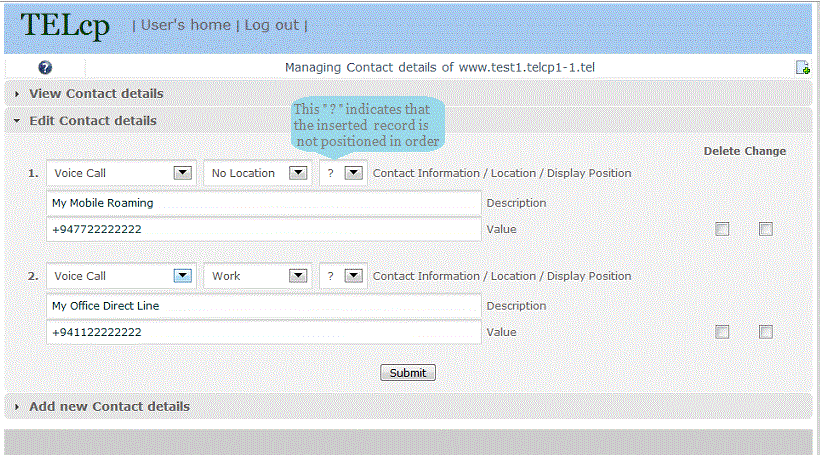
Shown below is a typical update page after adding new contact details.

tel User can organize the display order of the contact details by selecting the prefered position.
Check the delete box if you need to delete a contact detail.
Check the change box if you need to update a contact detail.
Expand to add more contact details.